Playing Music
copy this code
do
tune 0,15, (4,7,32,7,22,41 )
loop

The tune command allows musical tunes to be played using a speaker. In this case a piezo speaker does the job.
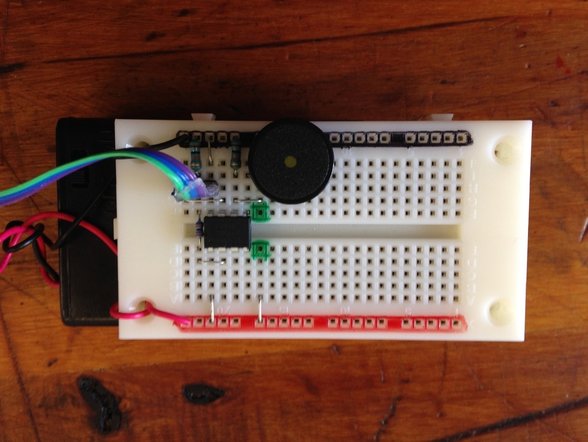
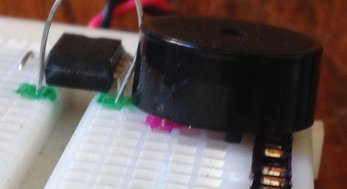
Attach it like this with one speaker leg in the hole marked with pink and the other speaker leg in the negative rail of the breadboard
Attach it like this with one speaker leg in the hole marked with pink and the other speaker leg in the negative rail of the breadboard
When programming the speaker use the following format:
tune pin, speed, (note, note, note)
pin on the 08M2 chip can only be pin 2. So instead this value is the LED_option.
numbers (0 -3) decides which outputs flash at the same time as the tune is being played.
0- No outputs
1- Output 0 flashes on and off
2- Output 4 flashes on and off
3- Outputs 0 and 4 flash alternately
The speed or tempo can be any value between 0 and 15.
The notes can be any value between 0 and 44:
Values between 0 and 16 = 1st octave
Values between 16 and 28 = 2nd octave
Values between 32 and 44 = 3rd (lower) octave
For example:
tune pin, speed, (note, note, note)
pin on the 08M2 chip can only be pin 2. So instead this value is the LED_option.
numbers (0 -3) decides which outputs flash at the same time as the tune is being played.
0- No outputs
1- Output 0 flashes on and off
2- Output 4 flashes on and off
3- Outputs 0 and 4 flash alternately
The speed or tempo can be any value between 0 and 15.
The notes can be any value between 0 and 44:
Values between 0 and 16 = 1st octave
Values between 16 and 28 = 2nd octave
Values between 32 and 44 = 3rd (lower) octave
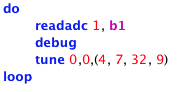
For example:
Linking Music to Sensors
do
readadc 1, b1
debug
tune 0,0, (4,7,32,9) '(b1)'
loop
Extra equipment needed: LDR (light dependent resistor) or similar
The program can be designed to take readings from input devices such as LDRs (light dependent resistors).
The program can be designed to take readings from input devices such as LDRs (light dependent resistors).
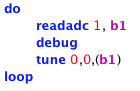
b1 reads the value of the LDR or any other input device and plays the corresponding note in response to the changing values.
